Mike Kelly explains the following heuristic approach to help ensure your testing is roughly inline based on orders of magnitude across the various types of automation. It’s not a method for measuring effectiveness. Instead it’s simply a “smell” to tell you when you might need to take a little extra time to make sure you’re focusing your automated testing efforts at the right level.
Many teams focus on automation at the level that’s easiest to automate given the team makeup and the readily available tools. For some teams, that means lots of automated unit tests. For others, it can mean large suites of GUI-level automation tests. Developers tend to favor automation similar to their regular daily work, and testers tend to favor tools more closely resembling their normal test routines. Or, said another way, when the team looks to implement automation, they identify the closest hammer and start swinging.
It’s this well-intentioned but adhoc approach to automation that often leads to gaps in coverage and implementation inefficiency. Some tests are more expensive to create and maintain than they need to be and other tests are weaker than they could be, because the team ends up executing those tests at the wrong level in the application.
The following is a heuristic approach to help ensure your testing is roughly inline based on orders of magnitude across the various types of automation. It’s not a method for measuring effectiveness. Instead it’s simply a “smell” to tell you when you might need to take a little extra time to make sure you’re focusing your automated testing efforts at the right level.
The Thirty-second Summary of Test Automation
Leveraging automated unit tests is a core practice for most agile teams. For some teams, this is part of a broader test-driven development practice and for others, it’s how they deal with the rapid pace and the need for regular refactoring. These tests often focus on class- and method-level concerns, as well as support development; they are not necessarily performed to do extensive testing in order to find issues.
In addition to unit tests, many teams also build out a healthy automated customer acceptance test practice. Oftentimes, these tests are tied to the acceptance criteria for the given stories being implemented within a given iteration. They sometimes look like unit tests (they don’t often exercise the user interface), but they tend to center more on the business aspect than unit tests. Automated acceptance tests are often created not only by developers but also by actual customers (or customer representatives) or people in the more traditional testing role.
As the product being developed grows over time, teams frequently develop other automated tests, which can take the form of more traditional GUI-level test automation. These scripts tend to span multiple areas of the product and focus more on scenarios and less on specific stories. In many cases, developers and testers create and maintain these tests.
A fourth type of automation emerges over time: A set of scripts for production monitoring. These can be really simple pings to the production environment in order to make sure the application is up and responding in a reasonable amount of time, or these could be more in-depth tests that ensure core functionality or third-party services are functioning as expected.
For example, if I were working on a Rails project, I might expect to see Rspec for unit tests, Cucumber for customer acceptance testing, Selenium for GUI-level automation, and perhaps New Relic for production monitoring. In a Java environment, I might look for Junit, Concordion, HP Quality Center, and OpenNMS. The specific tools aren’t as important as the intended focus of the automation.
Identifying Where You May be too Light or too Heavy on Coverage
For most teams, there’s rarely a conscious effort to balance the automation effort across these different focus areas. In my experience, when teams grow past five people, it’s hard to even get everyone together long enough to discuss big-picture test questions like automated-test coverage. When the team gets together, there are often more pressing topics to cover.
To spark some conversations around automated test coverage, I developed the following heuristic to help tip me off to when we might need to take a look at what and how we’re automating. Often, I can turn up a couple of gaps or inefficiencies. I look for specific orders of magnitude in my tests. Ideally, I’d like to see:
- 1000s of unit tests
- 100s of automated customer acceptance tests
- 10s of GUI-level automated tests
- 1s of production monitoring scripts
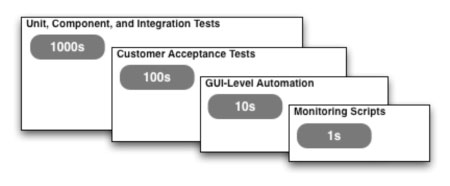
Figure 1: Orders of magnitude in test automation
These orders of magnitude are all relative. If I had ten thousands of unit tests, I’d expect to see thousands of automated customer acceptance tests, and so on down the line. Conversely, if you only have hundreds of unit tests, you’re just getting started. I wouldn’t expect more than a handful of acceptance tests and none of the other automation. As your code base grows, the number of tests required to maintain coverage likely will grow as well, so the specific numbers aren’t as important as the relative sizing.
For some teams, even questioning whether they have these four types of automation in place can be revealing. It’s not uncommon for teams to only have one or two types of automation, ignoring the others. In my experience, few teams think about coverage holistically across all four areas at the same time. When you start looking at these numbers, you’ll often spark much needed conversations around “How much is enough?” and “What are those tests actually testing?”
Bringing Balance to Your Automation
I find looking at orders of magnitude to be a great place to start the conversation, but once the team begins talking about coverage, conversations quickly move to topics like code, data, scenario, or some other aspect of coverage. We often start to look at relative metrics, including: How long does it take to run each set of tests? How often are they run? We start to look at the different types of issues (if any) that are found by each set of tests.
Facilitating a conversation around your automation is the goal. If you have 1,000 GUI-level tests but no automated customer acceptance tests—why? It’s likely that most of the bugs that could be found by those GUI-level tests could easily be found at the customer acceptance level. The customer acceptance tests would likely be run more often and would cost less to maintain. If you don’t have any GUI-level tests, are you really covering some of the core user interface functionality that may need to be tested on a regular basis?
As you start to identify areas where you may be too light or too heavy based on the heuristic, look for the following opportunities:
- Areas that you’ve completely ignored. For these areas, you might start to build out coverage.
- Areas where you’re more than an order of magnitude off. Ask yourself why. Did we do that on purpose? Do those tests provide the right type of value? Does that area really have too much coverage or are all the other areas light on their coverage?
- Tests that you’ve written at a “higher” level (or closer to the user interface) that can be rewritten and managed more effectively at a “lower” level (or closer to the code).
As you start to address the gaps and areas where you might have too little or too much coverage, engage the rest of the team in a discussion around the best way to approach the problem. It may be that because of the type of product you’re building, this heuristic won’t work for you. That’s OK. Work with the team to figure out what type of mix might be a better representative of what you’d like to work toward. These numbers can become one of many factors you can use to get better alignment in your test automation.