Approaching performance testing with a rigid plan and narrow specialization often leads to testers' missing performance problems or to prolonged performance troubleshooting. By making the process more agile, the efficiency of performance testing increases significantly—and that extra effort usually pays off multi-fold, even before the end of performance testing.
While it is definitely better to build-in performance during the design stage and continue performance-related activities through the whole software lifecycle, quite often performance testing happens just before going live with very little time allocated for it. Still, approaching performance testing formally, with a rigid, step-by-step plan and narrow specialization often leads to testers' missing performance problems altogether or to the prolonged agony of performance troubleshooting. With a little extra effort to make the process more agile, efficiency of performance testing increases significantly—and this extra effort usually pays off multi-fold, even before the end of performance testing.
Pitfalls of the Waterfall Approach to Performance Testing
As computer systems become more and more complex, the number of people involved in the performance area grows significantly. Performance testing probably is the most growing area related to performance. Most large corporations have performance testing and engineering groups today, performance testing becomes a "must" step to get the system into production. Still, in most cases, it is preproduction performance validation only.
Even if it is only a short preproduction performance validation, performance testing is a project itself, with multiple phases of requirement gathering, test design, test implementation, test execution, and result analysis. So in most cases, software development methodologies could, with some adjustments, be applicable to performance testing.
The waterfall approach to software development is a sequential process in which development is seen as flowing steadily downwards (like a waterfall) through the phases of requirements analysis, design, implementation, testing, integration, and maintenance. [1] Being a step in the project plan, performance testing is usually scheduled in the waterfall way, when you need to finish one step to start next. FOr example, typical steps could be:
- Get the system ready
- Develop scripts requested (sometimes offshore)
- Run scripts in the requested combinations
- Compare with the requirements provided
- Allow some percentage of errors according to the requirements
- Involve the development team if requirements are missed
At first glance, the waterfall approach to performance testing appears to be a well-established, mature process. But there are many serious pitfalls to this approach. Here are some of the most significant:
- It assumes that the system is completely ready. At minimum, all functionality components are included in the performance test. The direct result of waiting until the system is "ready" is that testing must occur very late in the development cycle. By that point, fixing any problem would be very expensive. It is not feasible to perform such full-scope performance testing early in the development lifecycle. If we want to do something earlier, it should be a more agile or explorative process.
- Performance test scripts that are used to create the system load are also software. Record/playback load testing tools may give the tester the false impression that creating scripts is quick and easy. In fact, correlation, parameterization, debugging, and verification may be pretty challenging tasks. Running a script for a single user that doesn't yield any errors doesn't prove much. I have seen large-scale performance testing efforts at a large corporation where none of the script executions actually got through log on (single sign on token wasn't correlated), but performance testing was declared successful and the results were reported to management.
- Running all scripts together makes it very difficult to tune and troubleshoot. It usually becomes a good illustration of the Shot-in-the-Dark anti-pattern [2], "the best efforts of a team attempting to correct a poorly performing application without the benefit of truly understanding whythings are as they are." Or you need to go back and disintegrate tests to find the exact part causing problems. Moreover, tuning and performance troubleshooting are iterative processes, which are difficult to place inside the waterfall approach. And, in most cases, it is not something you can do offline—you need to tune the system and fix the major problems before results will make sense.
- Running a single large test (or even a few of them) gives minimal information about the system behavior. You cannot build any kind of model (either formal or informal); you will not see any relationship between workload and system behavior. In most cases, the workload used in performance tests is only an educated guess, so you need to understand how stable the system would be and how consistent results would be if real workload were somewhat different.
Doing performance testing in a more agile, iterative way may increase its efficiency significantly.
Defining Agility
The word agile in this paper doesn't refer to any specific development process or methodology. Performance testing for agile development projects is a separate topic not covered in this paper. Rather, "agile" is used as an application of the agile principles to performance engineering. It is stated in "Manifesto for Agile Software Development" [3]:
We are uncovering better ways of developing software by doing it and helping others do it.
Through this work we have come to value:
Individuals and interactions over processes and tools
Working software over comprehensive documentation
Customer collaboration over contract negotiation
Responding to change over following a planThat is, while there is value in the items on the right, we value the items on the left more.
The goal of this paper is to demonstrate the importance of "left-side" values for performance engineering and give a few specific illustrations.
Testing Early
I have never read nor heard anybody argue against testing early. Nevertheless, it still rarely happens in practice. Usually there are some project-specific reasons like tight schedule or budget preventing such activities (if somebody thought about them at all).
Dr. Neil Gunther in his book Guerilla Capacity Planning [4] described the reasons why management (consciously or unconsciously) resists early testing. While Dr. Gunther's book presents a broader perspective on capacity planning, the methodology presented, including the guerrilla approach, is highly applicable to performance engineering. Not many projects schedule all necessary performance engineering activities with proper time and resources allocated. It may be better to realize from the beginning that it won't be the case and proceed in a "guerilla" fashion: conduct smaller performance engineering activities that don't require extensive time and resources, even beginning with just a few key questions, and then expanding those further if time permits.
The software performance engineering (SPE) approach to the development of software systems to meet performance requirements has long been advocated by Dr. Connie Smith and Dr. Lloyd Williams. [5] While their methodology doesn't focus on testing initiatives, SPE cannot be successfully implemented without some preliminary testing and data collection to determine both model inputs and parameters as well as to validate model results. Whether you are considering a full-blown SPE or guerilla–style "back-of-the-envelope" approach, you still need to obtain baseline measurements on which to build your calculations. Early performance testing at any level of detail can be very valuable at this point.
One rarely discussed aspect of early performance testing is unit performance testing. The unit here maybe any part of the system like a component, service, or device. It is not a standard practice, but should be. As we get later in the development cycle, it is more costly and difficult to make changes. Why should we wait until the whole system is assembled to start performance testing? We don't wait in functional testing, why should we in performance? The predeployment performance test is an analogue of system or integration tests, but usually it is conducted without any "unit testing" of performance.
The main obstacle here is that many systems are pretty monolithic: If there are parts, they don't make much sense separately. But there may be significant advantages to test-driven development. If you can decompose the system into components in such way that you may test them separately for performance, then you will only need to fix integration issues when you put the system together. Another problem is that large corporations use a lot of third-party products where the system appears as a "black box" and is not easily understood, making it more difficult to test effectively.
During unit testing, different variables such as load, the amount of data, security, etc., can be reviewed to determine their impact on performance. In most cases, test cases are simpler and tests are shorter in unit performance testing. There are typically fewer tests with limited scope, e.g., fewer number of variable combinations than we have in a full stress and performance test.
We shouldn't underestimate the power of the single-user performance test. If the performance of the system for a single user isn't good, it won't be any better for multiple users. Single-user testing is conducted throughout the application development lifecycle, during functional and user acceptance testing. Gathering performance data can be extremely helpful during these stages. In fact, the single-user performance test may facilitate the detection of performance issues earlier. Single-user performance can provide a good indication of what business functions and application code need to be investigated further. Additionally, between single-user tests and load tests there are also functional multi-user tests as described in Karen Johnson's article. [6] A good test with a few users can also help identify a lot of problems that may be very difficult to diagnose during load testing.
While early performance engineering is definitely the best approach (at least for product development) and has long been advocated, it is still far from commonplace. The main problem here is that mentality should be changed from a simplistic record/playback performance test occurring late in the product lifecycle to a more robust true performance engineering approach starting early in the product lifecycle. You need to translate "business functions" performed by the end-user into component and unit-level usage, and end-user requirements into component and unit-level requirements, etc. You need to go from the record/playback approach to utilizing programming skills to generate the workload and also to create stubs to isolate the component from other parts of the system. You need to go from "black box" performance testing to "grey box."
Another important kind of early performance testing is infrastructure benchmarking; the hardware and software infrastructure is also a component of the system.
Noting the importance of early performance work, quite often, it is just not an option. If you are around from the beginning of the project and know that you will be involved, a few guerilla-style actions can save you (and the project) a lot of time and resources later. Still, the case when you get on the project just for predeployment performance testing is, unfortunately, typical enough. You need test the product for performance before going live as well as you can in the given timeframe. The following sections discuss what you still can do in such situations.
Don't Underestimate Workload Generation
I believe that the title of the Andy Grove book Only the Paranoid Survive [7] relates even better to performance engineers than it does to executives. I can imagine an executive who isn't paranoid, but I can't imagine a good performance engineer without this trait. And it is applicable to the entire testing effort from the scenarios you consider to the scripts you create to the results you report.
Be a Performance Test Architect
There are two large elements that require architect-type expertise:
1) Gathering and validation of all requirements (first of all, workload definition) and projecting them onto the system architecture.
Too many testers consider all the detailed information that they obtain from the business people (i.e., workload descriptions, scenarios, use cases, etc.) as the "holy script." But business people know the business, and they rarely know anything about performance engineering. So obtaining requirements is an iterative process and every requirement submitted should be evaluated and, if possible, validated. [8] Sometimes performance requirements are based on reliable data, sometimes they are just a pure guess, but it is important to understand how reliable they are.
The load the system can handle should be carefully scrutinized: The workload is an input to testing, while response times are output. You may decide if response times are acceptable even after the test—but you should define workload before.
The gathered requirements should be projected onto the system architecture. It is important to understand if included test cases add value testing different set of functionality or different components of the system. From another side, it is important to make sure that we have test cases for every component (or, if we don't, we know why).
2) Making sure that the system under test is properly configured and the results obtained may be used (or at least projected) for the production system.
Environment and setup-related considerations can have a dramatic effect. Here are a few:
- What data are used? Is it real production data, artificially generated data, or just a few random records? Does the volume of data match the volume forecasted for production? If not, what is the difference?
- How are users defined? Do you have an account set up with the proper security rights for each virtual user or do you plan to re-use a single administrator id?
- What are the differences between the production and the test environment? If your test system is just a subset of your production, can you simulate the entire load or just a portion of that load? Is the hardware the same?
It is important to get the test environment as close as possible to the production environment, but some differences may still remain. Even if we were to execute the test in the production environment with the actual production data, it would only represent one point in time; other conditions and factors would also need to be considered. In "real life," the workload is always random, changing each moment, including actions that nobody could even guess.
Performance testing isn't an exact science. It is a way to decrease the risk, not to eliminate it completely. Results are as meaningful as the test and environment you created. Usually performance testing has small functional coverage, no emulation of unexpected events, etc. Both the environment and the data are often scaled down. All these factors confound the straightforward approach to performance testing, which states that we simply test X users simulating test cases A and B. This leaves a lot of questions, for example: How many users can the system handle? What happens if we add other test cases? Do ratios of use cases matter? What if some administrative activities happen in parallel? All these questions require some investigation.
Perhaps you even need to do some investigation to understand the system before you start creating performance testing plans. Performance engineers sometimes have system insights that nobody else has, for example:internal communication between client and server if recording used, timing of every transaction (which may be detailed up to specific requests and set of parameters if needed), and resource consumption used by specific transaction or set of transactions.
This information is actually additional input to test design, often the original test design is based on incorrect assumptions and needs to be corrected based on the first results.
Scripting Process
There are very few systems today that are stateless systems with static content using plain HTML—the kind of systems that lend themselves to a simplistic record/playback approach. In most cases, there are many stumbling blocks in your way to create a proper workload. Starting from the approach you use to create the workload, the traditional record/playback approach just doesn't work in many cases. [9] If it is the first time you see the system, there is absolutely no guarantee that you can quickly record and playback scripts to create the workload, if at all.
Creating performance testing scripts and other object is, in essence, a software development project. Sometimes automatic script generation from recording is mistakenly interpreted as the whole process of script creation, but it is only the beginning. Automatic generation provides ready scripts in very simple cases; in most non-trivial cases it is just a first step. You need to correlate (get dynamic variables from the server) and parameterize (use different data for different users) scripts. These are operations prone to errors because we make changes directly in the communication stream. Every mistake is very dangerous because such mistakes usually can not happen in the real world where the users work with the system through a user interface or API calls.
After the script is created, it should be evaluated for a single user, multiple users, and with different data. You should not assume that the system works correctly when the script was executed without errors. A very important part of load testing is workload validation. We should be sure that the applied workload is doing what it is supposed to do and that all errors are caught and logged. It can be done directly by analyzing server responses or, in cases when this is impossible, indirectly. It can be done, for example, by analyzing the application log or database for the existence of particular entries.
Many tools provide some way to verify workload and check errors, but a complete understanding of what exactly is happening is necessary. For example, HP LoadRunner reports only HTTP errors for web scripts by default (like 500 “Internal Server Error”). If we rely on the default diagnostics, we could still believe that everything is going well when we get “out of memory” errors instead of the requested reports. To catch such errors, we should add special commands to our script to check the content of HTML pages returned by the server.
When a script is parameterized, it is good to test it with all possible data. For example, if we use different users, a few of them could be not set up properly. If we use different departments, a few of them may be mistyped or contain special symbols, which in some context should be properly encoded. These issues are easy to find in the beginning, when you just debug particular script. But if you wait for the final, all-script tests, these errors mud the whole picture and make difficult to find the real problems.
My group specializes in performance testing of the Hyperion line of Oracle products. A few scripting challenges exist for almost every product. Nothing exceptional—you should be able to resolve them if you have some experience and are attentive enough, but time after time we are called to save performance testing projects ("your system doesn't perform") to find out that there are serious problems with scripts and scenarios that make test results meaningless. Even very experienced testers stumble, but problems could be avoided if more time were spent analyzing what is going on. Let's consider a couple of examples of typical challenges you may face with modern Web-based applications.
1) Some operations, like financial consolidation, can take a long time. The client starts the operation on the server and then waits until it finishes, a progress bar is shown in meanwhile. When recorded, the script (in LoadRunner pseudo-code) looks like :
web_custom_request("XMLDataGrid.asp_7",
"URL={URL}/Data/XMLDataGrid.asp?Action=EXECUTEamp;TaskID=1024amp;RowStart=1amp;ColStart=2amp;RowEnd=1amp;ColEnd=2amp;SelType=0amp;Format=JavaScript",
LAST);
web_custom_request("XMLDataGrid.asp_8",
"URL={URL}/Data/XMLDataGrid.asp?Action=GETCONSOLSTATUS",
LAST);
web_custom_request("XMLDataGrid.asp_9",
"URL={URL}/Data/XMLDataGrid.asp?Action=GETCONSOLSTATUS",
LAST);
web_custom_request("XMLDataGrid.asp_9",
"URL={URL}/Data/XMLDataGrid.asp?Action=GETCONSOLSTATUS",
LAST);
What each request is doing is defined by the ?Action= part. The number of GETCONSOLSTATUS requests recorded depends on the processing time. In the example above it was recorded three times, meaning that the consolidation was done by the moment the third GETCONSOLSTATUS request was sent to the server. If you playback this script, it will work in the following way: The script submits the consolidation in the EXECUTE request and then calls GETCONSOLSTATUS three times. If we have a timer around these requests, the response time will be almost instantaneous. While in reality, the consolidation may take many minutes or even an hour (yes, this is a good example of when people may be happy with a one-hour response time in a web application). If we have several iterations in the script, we will submit several consolidations, which continue to work in the background, competing for the same data, while we report sub-second response times.
Consolidation scripts require creating an explicit loop around GETCONSOLSTATUS to catch the end of consolidation:
web_custom_request("XMLDataGrid.asp_7",
"URL={URL}/Data/XMLDataGrid.asp?Action=EXECUTEamp;TaskID=1024amp;RowStart=1amp;ColStart=2amp;RowEnd=1amp;ColEnd=2amp;SelType=0amp;Format=JavaScript",
LAST);
do {
sleep(3000);
web_reg_find("Text=1","SaveCount=abc_count",LAST);
web_custom_request("XMLDataGrid.asp_8",
"URL={URL}/Data/XMLDataGrid.asp?Action=GETCONSOLSTATUS",
LAST);
} while (strcmp(lr_eval_string("{abc_count}"),"1")==0);
Here the loop simulates the internal logic of the system sending GETCONSOLSTATUS requests every three seconds until the consolidation is done. Without such loop, the script just checks the status and finishes the iteration while the consolidation continues for a long time after that.
2) Web forms are used to enter and save data. For example, one form can be used to submit all income-related data for a department for a month. Such a form is a web page with two drop-down lists (one for departments and one for months) on the top and a table to enter data underneath them. You choose a department and a month on the top of the form and then enter data for the specified department and month. If you leave the department and month in the script hard coded as recorded, the script would be formally correct, but the test won't make sense at all—each virtual user will try to overwrite exactly the same data for the same department and the same month. To make it meaningful, the script should be parameterized to save data in different data intersections. For example, different departments may be used by each user. To parameterize the script, we need not only department names but also department ids (which are internal representation not visible to users and should be extracted from the metadata repository). Below is a sample of correct LoadRunner pseudo-code (where values between { and } are parameters that may be generated from a file).
web_submit_data("WebFormGenerated.asp",
"Action=hfmtest.us.schp.com/HFM/data/WebFormGenerated.asp?FormName=Tax+QFPamp;caller=GlobalNavamp;iscontained=Yes",
ITEMDATA,
"Name=SubmitType", "Value=1", ENDITEM,
"Name=FormPOV", "Value=TaxQFP", ENDITEM,
"Name=FormPOV", "Value=2007", ENDITEM,
"Name=FormPOV", "Value=[Year]", ENDITEM,
"Name=FormPOV", "Value=Periodic", ENDITEM,
"Name=FormPOV", "Value={department_name}", ENDITEM,
"Name=FormPOV", "Value=lt;Entity Currencygt;", ENDITEM,
"Name=FormPOV", "Value=NET_INCOME_LEGAL", ENDITEM,
"Name=FormPOV", "Value=[ICP Top]", ENDITEM,
"Name=MODVAL_19.2007.50331648.1.{department_id}.14.407.2130706432.4.1.90.0.345", "Value=lt;1.7e+3gt;;;", ENDITEM,
"Name=MODVAL_19.2007.50331648.1.{department_id}.14.409.2130706432.4.1.90.0.345", "Value=lt;1.7e+2gt;;;", ENDITEM,
LAST);
If the department name is parameterized but department id isn't, the script won't work properly. You won't get any error, but the information won't be saved. This is an example of a situation that never can happen in real-life usage—users working through GUI choose department name from a drop-down box (so it always will be correct) and matching id would be gotten automatically. Incorrect parameterization leads to sending impossible combinations of data to the server with unpredictable results. As far as we actually save information here, the validation would be to check what is saved after the test—if you see your data there, the script is working.
Performance Tuning and Troubleshooting
Usually, when people are talking about performance testing, they do not separate it from tuning, diagnostics, or capacity planning. “Pure” performance testing is possible only in rare cases when the system and all optimal settings are well known. Some tuning activities are usually necessary at the beginning of the testing to be sure that the system is properly tuned and the results are meaningful. In most cases, if a performance problem is found, it should be diagnosed further up to the point when it is clear how to handle it. Generally speaking, “performance testing,” “tuning,” “diagnostics,” and “capacity planning” are quite different processes and excluding any of them from the test plan (if they are assumed) will make it unrealistic from the beginning.
Both performance tuning and troubleshooting are iterative processes where you make the change, run the test, analyze the results, and repeat the process based on the findings. The advantage of performance testing is that you apply the same synthetic load, so you can accurately quantify the impact of the change that was made. That makes it much simpler to find problems during performance testing rather than waiting until they happen in production where workload is changing all the time. Still, even in the test environment, tuning and performance troubleshooting are quite sophisticated diagnostic processes usually requiring close collaboration between a performance engineer running tests and developers or system administrators making changes. In most cases, it is impossible to predict how many test iterations would be necessary. Sometimes it makes sense to create a shorter and simpler test still exposing the problem under investigation. Running a complex, real-life test on each tuning or troubleshooting iteration can make the whole process very long as well as make the problem less evident due to different effects the problem may have on different workloads.
An asynchronous process to fixing defects—testers look for bugs and log them into a defect-tracking system, and then the defects are prioritized and independently fixed by development—is often used in functional testing but doesn't work well for performance testing. First, a reliability or performance problem quite often blocks further performance testing until the problem is fixed or a workaround is found. Second, usually the full setup, which often is very sophisticated, should be used to reproduce the problem. Keeping the full setup for a long time can be expensive or even impossible. Third, debugging performance problems is a quite sophisticated diagnostic process usually requiring close collaboration between a performance engineer running tests and analyzing the results and a developer profiling and altering code. Special tools may be necessary: Many tools, like debuggers, work fine in a single-user environment, but do not work in the multi-user environment, due to huge performance overheads. What is usually required is the synchronized work of performance engineering and development to fix the problems and complete performance testing.
Building a Model
Creating a model of the system under test is very important and significantly increases the value of performance testing. First, it is one more way to validate test correctness and help to identify problems with the system—if you see deviations from the expected behavior, it may mean issues with the system or issues with the way you create workload. [10] Second, it allows answering questions about sizing and capacity planning of the system.
It doesn't need to be a formal model created by a sophisticated modeling tool (at least for the purpose of performance testing—if any formal model is required, it is a separate activity). It may be just simple observations of how much resources on each component of the system are needed for the specific workload. For example, the workload A creates significant CPU utilization on the server X while the server Y is hardly touched. This means that if you increase the workload A, the lack of CPU resources on the server X will create a bottleneck. As you run more and more complex tests, you verify results against your "model," your understanding of how the system behaves, and if they don't match, you need to figure out what is wrong.
Modeling often is associated with queuing theory and other sophisticated mathematical constructs. While queuing theory is a great mechanism to build sophisticated computer system models, it is not required in simple cases. Most good performance engineers and analysts build a model subconsciously, even without using such words or any formal efforts. While they don't describe or document this model in any way, they see when the system behaves in an unusual way (doesn't match the model) and they can do some simple predictions (for example, it doesn't look like we have enough resources to handle X users).
The best way to understand the system is to run independent tests for each business function to generate a workload resource profile. The load should be not too light (so resource utilization will be steady and won't be distorted by noise) nor too heavy (so resource utilization won't be distorted by non-linear effects). These kinds of tests are described as T2 in the "T1 – T2 – T3" approach to modeling. Gimarc's paper [11] presents a methodology for constructing tests and collecting data that can be used both for load testing and modeling efforts. The paper describes an approach where modeling can serve to validate the testing effort as well as to project performance at loads or conditions that weren't tested. There are three types of tests considered in the paper. The first is T1, a single business function trace, used to capture the tier-to-tier workflow of each of the application's business function. The second is T2, a single business function load test, designed to determine the system resources required to process each business function on each server. The third is T3, which is a typical load test with multiple business functions, used to validate the model.
Considering the working range of processor utilization, linear models can be often used instead of queuing models for the modern multi-processor machines (it is less so for single-processor machines). If there are no bottlenecks, throughput (the number of requests per unit of time) as well as processor utilization should increase proportionally to the workload (for example, the number of users) while response time should grow insignificantly. If we don't see this, it means that a bottleneck exists somewhere in the system and we need to discover where it is.
For example, a simple queuing model was built using TeamQuest's modeling tool for a specific workload executing on a four-way server. It was simulated at eight different load levels (step 1 to step 8, where step 1 represents a one hundred-user workload and each next step added 200 users, so that finally step 8 represents 1,500 users). Figures 1, 2, and 3 show throughput, response time, and CPU utilization from the modeling effort.
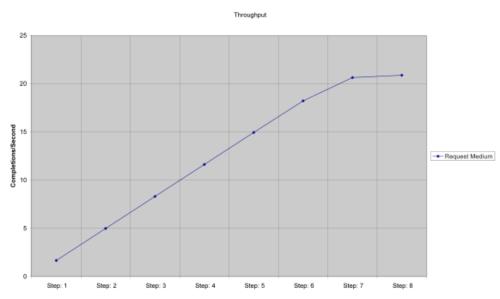
Figure 1: Throughput
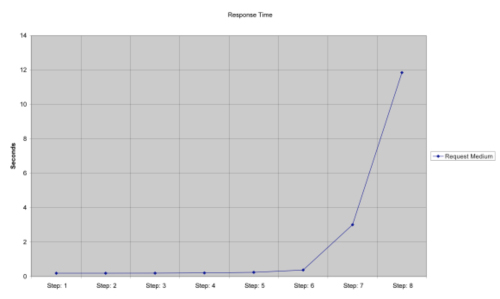
Figure 2: Response time
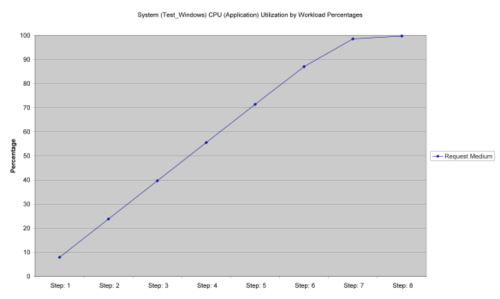
Figure 3: CPU Utilization
An analysis of the queuing model results shows that the linear model accurately matches the queuing model through step 6 where the system CPU utilization is 87 percent. Most IT shops don't want the system to be loaded more than 70 to 80 percent.
This doesn't mean that we need to discard queuing theory and sophisticated modeling tools; we need them when systems are more complex or where more detailed analysis is required. But in the middle of a short-term performance engineering project, it may be better to build a simple, back-of-the-envelope, type of model to see if the system behaves as expected. Most experienced performance engineers build such models subconsciously and, even if they don't write it all down, they still observe if the system doesn't behave as expected.
Running all scripts together makes it difficult to build a model. While you still can make some predictions for scaling the overall workload proportionally, it won't be easy to find out where the problem is if something doesn't behave as expected. The value of modeling increases drastically when your test environment differs from the production environment. In this case, it is important to document how the model projects testing results onto the production system.
Making Performance Testing Agile
Agile software development refers to a group of software development methodologies that promotes development iterations, open collaboration, and process adaptability throughout the lifecycle of the project [12]. The same approaches are fully applicable to performance testing projects. Performance testing is somewhat agile by its nature; it often resembles scientific research rather than the routine execution of one plan item after another. Probably the only case where you really can do performance testing in a formal way is when you test a well-known system (some kind of performance regression testing). You can’t plan every detail from the beginning to the end of the project—you never know at what load level you'll face problems and what you would be able to do with them. You should have a plan, but it needs to be very adaptable. It becomes an iterative process involving tuning and troubleshooting in close cooperation with developers, system administrators, database administrators, and other experts [13].
Performance testing is iterative: You run a test and get a lot of information about the system. To be efficient you need to analyze the feedback you get from the system, make modifications to the system and adjust your plans if necessary. For example, you plan to run twenty different tests, and after executing the first test, you find that there is a bottleneck (for example, the number of web server threads). Therefore, there is no point in running the other nineteen tests if they all use the web server, it would be just a waste of time until you find and eliminate the bottleneck. In order to identify the bottleneck, the test scenario may need to be changed.
Even if the project scope is limited to preproduction performance testing, approaching testing with an agile, iterative approach, you'll meet your goals faster and more efficiently and, of course, learn more about the system along the way. After we prepare a script for testing (or however the workload is generated), we can run one, a few, and many users (how many depends on the system), analyze results (including resource utilization), and try to sort out any errors. The source of errors can be quite different—script error, functional error, or a direct consequence of a performance bottleneck. It doesn't make much sense to add load until you figure out what is going on. Even with a single script you can find many problems and, at least partially, tune the system. Running scripts separately also allows you to see how many resources are used by each type of load and make some kind of system "model."
Using the waterfall approach doesn’t change the nature of performance testing; it just means that you probably do a lot of extra work and still come back to the same point—performance tuning and troubleshooting—much later in the cycle. Not to mention that large tests using multiple use cases are usually a bad point to start performance tuning and troubleshooting. Symptoms you see may be a cumulative effect of multiple issues.
Using an agile, iterative approach doesn't mean that you need to redefine the software development process, but rather find new opportunities inside existing processes. I believe that most good performance engineers are already doing performance testing in an agile way but they're just presenting it as waterfall to management (some kind of guerilla tactic). In most cases, you need to present a waterfall-like plan to management, and then you are free to do whatever is necessary to properly test the system inside the scheduled timeframe and scope. If opportunities exist, performance engineering may be extended further, for example, to early performance checkpoints or even full software performance engineering [4]. But don't wait until everything is properly in place, make the best possible effort and then look for opportunities to extend it further [4].
References
[1] Waterfall Model, Wikipedia, retrieved from http://en.wikipedia.org/wiki/Waterfall_model
[2] Pepperdine K. "Proposed Anti-Pattern, Shot in the Dark", Kirk Pepperdine's Blog, 10 July 2006.
[3] Manifesto for Agile Software Development, 2001 http://agilemanifesto.org/
[4] Gunther N. Guerilla Capacity Planning: A Tactical Approach to Planning for Highly Scalable Applications and Services, Springer-Verlag, 2007.
[5] Smith C., Williams L. Performance Solutions, Addison-Wesley, 2002.
[6] Johnson K. "Multi-User Testing", Software Test & Performance, February 2008, 20-23.
[7] Grove A. Only the Paranoid Survive, Doubleday, New York, 1996.
[8] Podelko A. "Multiple Dimensions of Performance Requirements", CMG, 2007.
[9] Podelko A. "Workload Generation: Does One Approach Fit All?",CMG, 2005.
[10] Gunther N. "Benchmarking Blunders and Things That Go Bump in the Night", MeasureIT, June 2006 (Part I), August 2006 (Part II).
http://www.cmg.org/measureit/issues/mit32/m_32_2.html
http://www.cmg.org/measureit/issues/mit34/m_34_1.html
[11] Gimarc R., Spellmann A., Reynolds J. "Moving Beyond Test and Guess. Using Modeling with Load Testing to Improve Web Application Readiness", CMG, 2004.
[12] Agile Software Development, Wikipedia, retrieved from http://en.wikipedia.org/wiki/Agile_software_development
[13] Podelko A. "Load Testing: Points to Ponder", CMG, 2006.